

ShowMe WorldCare End User Manual
Tips for Easier Navigation Among Different Record Types
Users do not have to return to the search menu to access different records that are linked. It is possible to use the links within the records to move to different records by always returning to a central record.
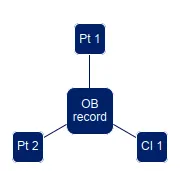
SMWC Tip: As an example, suppose an investigator is working on an outbreak with 2 linked patients (condition records) and 1 linked contact (contact investigation record).
- At the beginning of the day, the investigator searches for and opens the outbreak record.
- They click on the first patient listed to open the first patient’s condition record.
- They review/update the first patient’s condition record, click on the Administrative tab, click Submit and click the Go To button to return to the outbreak record.
- The investigator now clicks on the link to the second patient’s condition record, updates it, Submits and clicks the Go To button to return to the outbreak record.
- The investigator follows a similar process to access the Contact Investigation record.
- The investigator completed all this work with a single search!
Similar navigation could be used when reviewing a patient with multiple contacts. From each contact investigation record, the user could navigate back to the original patient to select the next contact.