

About This Manual
Vaccines For Children Provider Manual
This document serves as a manual to understand and implement the requirements and policies of the Missouri Vaccines for Children (VFC) program. The general term used throughout this guide is “VFC provider” and refers to all providers in Missouri who receive publicly funded vaccine. When viewed online, this manual has clickable links and a table of contents. Providers should utilize the most current version of this manual by bookmarking the link.
Thank you for all that you do to protect Missouri’s citizens from vaccine preventable illness!
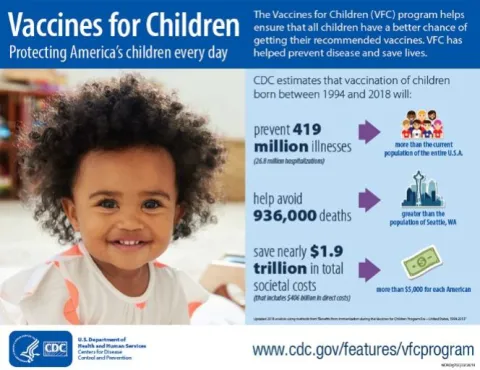
The Vaccines for Children Program is an entitlement program providing free vaccine to children and adolescents who might not otherwise be vaccinated due to inability to pay. The VFC Program was created in 1994 after a large measles outbreak. The Missouri VFC Program provides federally purchased vaccine to eligible providers enrolled in the VFC Program. Children who are eligible for the VFC Program are entitled to receive vaccines as recommended by the CDC Advisory Committee on Immunization Practices (ACIP), as published in the Centers for Disease and Control and Prevention’s (CDC’s) “Recommended Child and Adolescent Immunization Schedule for ages 18 years or younger” [BROKEN LINK].
VFC Program Benefits:
- Provides vaccine to public and private providers at no cost to the provider or parent.
- Eliminates cost as a barrier to vaccination.
- Provides cost-savings through bulk purchase at lower prices using CDC funding.
- Allows a child to receive vaccination(s) in his or her medical home.
Contacts and/or Support
VFC Program Questions? Contact your VFC Consultant [NEEDS LINK].
VFC Consultants complete onsite educational visits, site visits, unannounced storage and handling visits, and answer questions about VFC program and policy.
ShowMeVax Questions? Call 866-256-3166 or VFC-SMVsupport@health.mo.gov
The Vaccine Support Team assists VFC providers with orders, reconciliation, temperature excursions, returns, wastage and documentation of immunization records in ShowMeVax.

ShowMeVax is Missouri’s Immunization Information System (IIS). Missouri VFC providers must use ShowMeVax to enroll initially, complete VFC orders, submit VFC inventory reconciliation, finalize VFC returns or wastage, re-certify annually, and report vaccine administration by patient. Access to ShowMeVax can be requested online at the login screen. New users must click on the blue Request User Account icon and complete the account registration. Users will receive an individually assigned username and password.
By logging into ShowMeVax, users agree to the following:
- I am an authorized ShowMeVax user and am logging in using the login assigned to me by
the Missouri Immunization Program. - I will comply with the Missouri Immunization Information System Security and
Confidentiality Policy. - I will carefully and deliberately safeguard my ShowMeVax user ID and password and will
not permit the use of my ID and password by any other person. - I will handle ShowMeVax information in a confidential manner.
- I will never release data from ShowMeVax to any unauthorized persons or agencies.
- I will not knowingly enter invalid/false data; falsify any document or data obtained
through ShowMeVax. - I understand that all transactions are logged and may be subject to audit.
- I will not attempt to copy the database or software used in ShowMeVax.
- I will only use ShowMeVax to access information and generate documentation
necessary to properly conduct the administration and management of immunizations.
For electronic submission of vaccine administration by patient, please contact
edx@health.mo.gov for assistance. Effective January 1, 2021, all VFC providers must utilize
ShowMeVax for:
- enrolling and re-certifying in the VFC program;
- ordering and documenting VFC shipments;
- managing and reconciling VFC inventory;
- reporting wastage, transfers, and returns;
- recording temperature data from temperatures logs;
- borrowing and replacement of VFC vaccines; and
- documenting vaccine administration per patient.
VFC Program
Vaccines For Children Provider Manual
Enrollment Requirements
To participate in the VFC Program, a healthcare provider must have an active, unencumbered medical or advanced nursing practice license in the state of Missouri. In addition to providing practice information, Advance Nurse Practitioners and Physician Assistants must submit the supervising physician’s full name, medical license number and NPI during the enrollment process or during annual re-certification.
Initial Enrollment
Providers may join the VFC Program at any time. Prospective providers must request access to ShowMeVax and complete a ShowMeVax Memorandum of Agreement to begin the enrollment process. When you have received an email from the Immunization Bureau noting that the Memorandum of Agreement has been received and approved, you may continue with the enrollment process.
The next step is to login to ShowMeVax, go to ‘Clinic Tools’, ‘Enrollments’, click ‘Add New Enrollment’ and choose ‘Vaccines for Children (VFC) New Provider Enrollment’. All sections of the Enrollment must be complete – you must turn all yellow triangles into green check marks to submit. The first section of the Enrollment is the Preparation Section.
- Checklist – click on this section, then click on the link to view the checklist, you may print for reference, close that document, click the green ‘Save Progress’ button.
- Assets – click on this section, since you will use ShowMeVax to report your temperatures, click the ‘Yes’ radio button. For each unit that stores VFC/Section 317 vaccine, you must add the storage unit and the digital data logger assigned to the unit. In addition, the back-up digital data logger must be added. Thermometers must have a current calibration certificate, and the certificate must be uploaded into ShowMeVax. When the assets are complete, click the green ‘Save Progress’ button.
- Required staff and Staff Training – This section should have a listing of all staff that administer, deal with or order vaccines for your facility or clinic. This includes:
- The Medical Director should be listed as ‘Physician Signing Agreement’ with an alternate contact type of ‘Physician Contact’ (Z2). This contact must have an email address, a phone number, a license/National Provider Identifier (NPI) at a minimum.
- The Primary VFC Contact should be listed a ‘Non-Physician Contact (Primary)’ and this contact must have an email address and phone number.
- The Back-Up VFC Contact should be listed as ‘Non-Physician Contact (BackUp)’ and this contact must have an email address and phone number.
- Medical staff that prescribe vaccines should be listed as ‘Physician Contact’ (Z2) and should have a license/NPI number listed as well.
- All other staff should be listed as ‘Additional Staff Contact’ (for Office Managers or additional back-up staff).
You should only have one ‘Physician Signing Agreement’, one ‘Non-Physician Contact (Primary)’, and one ‘Non-Physician Contact (Back-Up)’. No other staff should be listed as a primary or back-up. The ‘Non-Physician Contact (Primary)’ and the ‘Non-Physician Contact (Back-Up)’ must have proof of his or her VFC training. Eligible VFC training can be met by: Completing VFC411 face to face, or, Completing CDC’s You Call the Shots modules found here. The Vaccines for Children and Vaccine Storage and Handling modules (both of the modules) must be completed to meet the requirement.
Or
Completing CDC’s You Call the Shots modules found at the CDC website. The Vaccines for Children and Vaccine Storage and Handling modules (both of the modules) must be completed to meet the requirement. To add the training, click on the ‘Edit’ to the far right of the ‘Staff Listing’. Once the individual’s information is visible, click on the ‘Add Training’ button near the bottom right. From the drop-down field, choose ‘VFC Training’, enter the date the training was completed and then browse for and upload the training certificate. Then click submit the training. When the staff section is complete, click on the green ‘Save Progress’ button.
- Delivery Hours- Delivery hours are the hours the clinic will be available to accept vaccine shipments. Clinics must be open at least two days per week with a minimum of four consecutive hours.
The next section of the enrollment process is the ‘Required Forms’ section:
- Provider/Clinic Profile
- Review Facility/Clinic Information – click on this section and complete all information; click on the green ‘Save Progress’ button.
- Provider/Clinic Population – click on this section and provide the information needed. DO NOT leave any boxes empty. You may use information from your billing department, from an electronic health or medical record system to complete this section. Click on the green ‘Save Progress’ button.
- Source of Data – Click on this section and check the boxes that show how you determined the numbers entered in the ‘Provider/Clinic Population’ section, click on the green ‘Save Progress’ button.
- Provider/Clinic Agreement
- Review Facility/Clinic Information – click on this section, review the information for accuracy and it if is correct then click the box to confirm the information is correct and click the green ‘Save Progress’ button.
- Review Medical Director or Equivalent Information – click on this section, review the information for accuracy – it must provide the name, email address and license/NPI number for the medical director – if it doesn’t have all this information do not confirm this section (return to previous instruction for making sure your staff listing is accurate). If the information has all the required accurate information, click the box to confirm the information is correct and click the green ‘Save Progress’ button.
- Review Vaccine Coordinators – click on this section, review the information for accuracy, each coordinator must have a telephone number and email address. If the information is accurate and complete, click the box to confirm the information is correct and click the green “Save Progress’ button. (If this section does not have the information for both coordinators DO NOT confirm this section – return to instructions for ensuring your staff listing is correct in ShowMeVax).
- Prescribing Staff Members – click on this section, ensure that the list includes your medical personnel that can prescribe vaccines – these people should have an NPI/license number listed. If the information is correct, click the box to confirm the information is correct and click the green ‘Save Progress’ button.
- Primary Agreement – ONLY the medical director can acquire the green checkmark for this section. The medical director must have ShowMeVax access. He/She must log into ShowMeVax using his or her credentials and open the recertification document and click on this section. They then electronically sign the provider agreement and click on the green ‘Save Progress’ button.
The third section of the Enrollment is the ‘Additional Questions’ section - Answer each question COMPLETELY.
- Once done with the questions, click on the green ‘Save Progress’ button. Once you have acquired ALL green checkmarks, click on the drop-down arrow next to the green ‘Save Progress’ button and click on ‘Submit Form’.
VFC providers must complete an Emergency Response Plan [NEEDS LINK] [BROKEN LINK] prior to the enrollment approval. The plan must be completed and submitted to the VFC Program. Clinics may submit the Emergency Response Plan by email to the VFC Consultant as noted on the VFC Consultant Map [NEEDS LINK].
Once the enrollment has been reviewed by the assigned VFC Consultant, the Consultant will contact the provider to schedule an Enrollment Site Visit. Final approval into the Missouri VFC Program is dependent upon approval of the VFC Consultant during the Enrollment Site Visit. After approval by the VFC Consultant, the practice may place an order for VFC stock.
Provider Identification Number (PIN)
The VFC Program will issue VFC providers a unique six-digit Provider Identification Number (PIN). Providers must reference the PIN in all communications and correspondence with the VFC Program.
Provider Profile
VFC providers must complete a provider profile during enrollment, re-certification, and when the provider population changes. The population profile defines the number of VFC eligible children and non-VFC-eligible children by age group. The information represents the estimated population served by the provider during the previous twelve (12) months; billing departments within provider organizations will often have access to this information. Electronic health records or electronic medical records can also provide population information. Providers are required to maintain a private vaccine inventory that is sufficient to serve the non-VFC-eligible population. Providers must stock a sufficient supply of VFC vaccine to serve the VFC eligible population. Sufficient supply is defined as a four-week inventory for private and VFC vaccine based on the provider population and includes all ACIP recommended vaccines.
Vaccine Management Plan and Emergency Response Plan
VFC providers must have a written Vaccine Management Plan [NEEDS LINK] [BROKEN LINK] in place. The management plan informs clinic staff and the VFC Program how the VFC stock will be handled. VFC providers are also required to have an Emergency Response Plan [NEEDS LINK] [BROKEN LINK]. This plan advises clinic staff and the VFC Program how VFC stock will be handled in times of peril. The Vaccine Management Plan and the Emergency Response Plan should be posted in a prominent area (e.g., close to the storage units) where they are accessible to clinic staff. These plans must be reviewed, updated, and signed annually or any time there is a change in clinic staff. These documents are reviewed at VFC site visits.
Record Retention
VFC providers must maintain all records (both paper and electronic) related to the VFC Program for a minimum of three years and make these records available for review upon request. These records include but are not limited to:
- Enrollment documentation
- Re-certification documentation
- VFC patient screening and eligibility documentation
- Billing records
- Medical records of immunizations
- VFC ordering records
- VFC inventory reconciliation records
- Vaccine purchase records (such as Borrowing Forms and/or invoices for replacement of borrowed or negligently used VFC vaccine)
Designated Primary VFC Contact
VFC providers must designate one fully trained staff member to be the Primary VFC Contact and at least one individual to be the Back-up VFC Contact. The Primary VFC Contact and one Back-Up VFC Contact must complete annual VFC education. The training component may be met by:
- Participating in a VFC site visit (Storage and Handling visits do not meet this requirement)
- Completing VFC411 face to face.
- Completing CDC’s You Call the Shots modules found here. The Vaccines for Children and Vaccine Storage and Handling modules (both of the modules) must be completed to meet the requirement.
Provider Changes in Staff or Status
VFC providers must notify the VFC Program by phone (866-256-3166), or email (VFCSMVsupport@health.mo.gov) for any change in staffing or status as noted below:
- Medical Director – Changes must be reported immediately in ShowMeVax under ‘Clinic Tools’, click on ‘Clinic Information’, and then click on ‘Staff’ to add a new Medical Director with the role of ‘Physician Signing Agreement’.
- Primary VFC Contact or Back-Up VFC Contact – Changes must be reported within ten days in ShowMeVax under ‘Clinic Tools’, click on ‘Clinic Information’, and then click on ‘Staff’ to add a new Primary VFC Contact or Back-Up VFC Contact.
- Listed prescribing staff members – Add or delete within ten days on the staff tab in ShowMeVax.
- Mailing or shipping address – Report changes in ShowMeVax under ‘Clinic Tools’, click on ‘Clinic Information’, and then click on ‘Address/Name’ and update.
- Vaccine delivery hours – Report changes in ShowMeVax immediately under ‘Clinic Tools’, click on ‘Clinic Information’, and then click on ‘Clinic Delivery Hours’ and update the changes.
- Provider status change (e.g., closure, merge, move)
- A change in provider status must be reported at least ten business days before moving to a new location. Complete the changes in ShowMeVax under ‘Clinic Tools’, click on ‘Clinic Information’, and then click on ‘Address/Name’ and update.
- Once VFC vaccine storage units have been moved to the new location, at least five days of stable, in-range temperatures must be recorded on a current, calibrated data logger thermometer prior to placing VFC stock back in the storage units.
Please contact the Vaccine Support Team if you have questions regarding provider staff changes or change in status.
Note: A new demographics page from the Memorandum of Agreement (MOA) must be submitted for address or clinic name changes. A new MOA is needed for organizational changes.
Annual Re-Certification
Annual Re-Certification is required for all VFC providers with an exception for providers that have had an initial site visit within ninety (90) days of the annual re-certification due date.
- Providers will complete the annual Re-Certification in ShowMeVax.
- VFC Consultants will assist VFC providers with the online Re-Certification process.
- Primary VFC Contacts will receive an annual Re-Certification reminder notice prior to the Re-Certification due date.
- Failure to recertify for the VFC program will result in suspension from ordering and then withdrawal from the VFC program. VFC vaccine will be collected by the VFC Consultant. Providers will have to complete the initial enrollment process if more than six (6) months has lapsed between the Re-Certification due date and the collection of the VFC vaccine.
For assistance with annual Re-Certification, please contact your VFC Consultant.
Voluntary Withdrawal or Termination from the VFC Program
VFC providers or the VFC Program may terminate the VFC Provider Agreement at any time.
Facility Request: A VFC provider may withdraw from the VFC Program at any time. Providers must transfer all public stock to another approved VFC provider and submit the Disenrollment Form [NEEDS LINK] [BROKEN LINK].
Failure to comply with program requirements: A VFC provider that fails to comply with the VFC Program requirements or fails to implement appropriate and timely corrective action risks program suspension or dis-enrollment.
Failure to complete annual Recertification: A VFC provider who allows the current Provider Agreement to expire without Re-Certification will be suspended from the VFC program and may have to reapply.
VFC ordering: VFC providers who have not placed a VFC order within the past twelve (12) months will be withdrawn from the program.
Note: VFC providers must request permission to transfer VFC stock to another VFC provider prior to leaving the VFC Program. VFC providers are responsible for maintaining proper storage, temperature monitoring and temperature logs until and while VFC vaccine is transferred to another VFC provider.
Fraud and Abuse
Vaccines For Children Provider Manual
Fraud and abuse laws apply to the VFC Program.
Fraud is defined as in intentional deception that could result in a benefit to the provider/practice or other person.
Abuse is defined as provider practices that are inconsistent with requirements resulting in unnecessary costs or actions to the Medicaid, VFC or insurance programs or patients.
Fraud and Abuse Examples*
- Failing to comply with any part of the VFC Provider Agreement
- Providing VFC vaccine to non-VFC-eligible children
- Selling or otherwise misdirecting VFC vaccine
- Billing a patient or third party for VFC vaccine
- Charging more than the established vaccine administration fee
- Over-ordering VFC vaccine
- Waste of VFC vaccine
- Denying VFC-eligible children VFC-funded vaccine due to the parent’s inability to pay the vaccine administration fee
- Failing to screen for and document eligibility at each immunization contact
- Failing to maintain VFC records for a minimum of three years
- Failing to fully account for VFC vaccine
- Failing to properly store and handle VFC vaccine
* This list provides examples and is not considered comprehensive.
Any person may contact the VFC Program to report possible concerns or questions. Reports may be anonymous, and all are considered confidential. Please call the toll-free number 800-219-3224 to make a report.
Vaccine Eligibility and Documentation
Vaccines For Children Provider Manual
VFC providers must screen and document VFC eligibility at each vaccine encounter. Providers administering VFC vaccine should review age and whether the child meets the definition of at least one of the categories below.
VFC and Section 317 stock must be clearly differentiated in the storage units. VFC providers may utilize VFC stickers, use labels, or maintain separate storage units to complete the differentiation requirement. Staff administering VFC, Section 317 and private stock must have a clear clinic process that ensures staff knows which vaccine stock to select from prior to preparing the vaccine for administration.
VFC Eligibility Categories
Children from birth through eighteen (18) years of age (under nineteen (19) years) and meet at least one of the following criteria are eligible to receive VFC vaccine:
- Medicaid eligible – Any MO HealthNet eligible child or any child under a Managed Care MO HealthNet plan. Children covered by private insurance who have MO HealthNet as a secondary insurer ARE eligible for VFC vaccine (see Insured Exceptions). Note: A child is VFC-eligible in Missouri if they are insured by Medicaid in any state.
- Uninsured – A child who has no health insurance coverage. Children covered by health sharing plans or cost savings plans are considered uninsured in Missouri. These plans are non-profit alternatives to purchasing health insurance and are not recognized as insurance by the Missouri Department of Insurance.
- American Indian or Alaska Native
- Underinsured
- A child who has health insurance, but the coverage does not include vaccines.
- A child whose insurance does not cover all ACIP recommended vaccines. The child is eligible to receive from VFC only those vaccines not covered by the insurance.
- A child whose insurance caps vaccine cost at a certain limit. The child is eligible to receive VFC vaccine after the insurance cap has been reached.
- This category does not include children with a high or unmet deductible or those unable to pay the deductible.
Underinsurance, limited coverage and “caps” are increasingly uncommon coverage options and may only occur in insurance plans that are not compliant with the Affordable Care Act (ACA). ACA-compliant plans must cover all ACIP-recommended vaccines with no deductible or co-pay when administered by an in-network provider.
Note: Underinsured children may only receive VFC vaccine at a Federally Qualified Health Center (FQHC), Rural Health Center (RHC), or a Local Public Health Agency (LPHA).
Children who are ineligible for VFC vaccines include children whose health insurance covers vaccinations as a benefit.
Insured exceptions include:
American Indian/Alaska Native with health insurance that covers immunizations: American Indian and Alaska Native children are always VFC-eligible. For American Indian and Alaska Native children that have full immunization benefits through a primary private insurer, the decision to participate in the VFC program should be made based on what is most cost-beneficial to the child and family.
Insured, with Medicaid as secondary insurance: A child may have private health insurance and Medicaid as secondary insurance. The child is VFC-eligible as long as they are enrolled in Medicaid. However, the parent is not required to participate in the VFC Program. There are two options:
- Administer VFC vaccine and bill Medicaid for the administration fee.
- Administer private stock and bill the primary insurance for both the cost of the vaccine and the administration fee.
CHIP Vaccine
CHIP is a nationwide program for parents who are over the income guidelines to qualify for Medicaid but cannot afford insurance on the open market. Parents are charged a monthly premium and the child will have a Medicaid card; however, they are not considered Medicaid eligible VFC patients.
In order to accurately report and document the number of CHIP patients seen within our state, VFC providers are required to do the following:
- Verify eligibility (2 options):
- Check EMOMed (Preferred) through the MO HealthNet Web Portal or by calling 573-751-2896.
- You will be provided with an ‘ME’ or ‘Plan’ code. If the patient is a CHIP patient, the code will be either 73, 74, or 75.
- Ask the parent: If the parent provides a Medicaid card ask the parent: “Do you pay a monthly premium for your coverage?” If no, they are Medicaid. If yes, the patient meets CHIP qualifications.
- Check EMOMed (Preferred) through the MO HealthNet Web Portal or by calling 573-751-2896.
- Document patient eligibility in your electronic medical record (EMR) or ShowMeVax as CHIP.
- When documenting the immunization given, choose ‘CHIP’ as the funding source. If this is not an option within your EMR, you will need to contact your EMR to add this option.
- Inventory documentation:
- Select CHIP as the funding source for the patient in your inventory documentation method.
- If there are no ‘CHIP’ doses in your inventory, you will:
- Document as a VFC dose.
- Complete a borrowing report and keep onsite for review.
- Do not open another box of vaccines before using all doses.
- For example: If you have given all of your VFC doses to VFC patients and another VFC patient at your clinic needs a vaccine, you would administer a CHIP dose and complete a borrowing report.
- REMINDER: You do not have to pay back VFC doses or CHIP doses that were borrowed for VFC or CHIP patients.
See example below for how to complete the borrowing form.

For assistance, you may reach out to the Vaccine Support Team at vfc-smvsupport@health.mo.gov or 866-256-3166 or your VFC Consultant.
If you are certain that you do not see CHIP participants, you may send an email to the Vaccine Support Team at VFC-SMVsupport@health.mo.gov.
Section 317 Vaccine
Local Public Health Agencies (LPHAs), some Rural Health Clinics (RHCs), and Federally Qualified Health Centers (FQHCs) are able to offer select vaccines to uninsured and underinsured adults. Section 317 funded vaccines must be separated from VFC and private stock. Funding is provided by the CDC and is limited; 317 providers must screen adults at each immunization contact for eligibility. All 317 vaccine orders must be submitted to ShowMeVax separately and not included with pediatric orders. To ensure equitable distribution of 317 vaccines, all orders will be reviewed by program staff. Providers administering 317 vaccines must enter vaccine administration per patient in ShowMeVax and offer walk-in appointments. If all vaccine appointments are scheduled, a provider may make a follow-up appointment for a walk-in 317 patient.
All 317 vaccine fall under the Vaccine Replacement Policy. Providers must attempt to transfer 317 vaccines to at least three (3) other 317 providers at least ninety (90) days prior to the expiration. FQHCs participating in the 317 program may be contacted for transfers of short-dated 317 stock. For a list of participating FQHCs, you may contact the Vaccine Support Team or your VFC Consultant.
Documentation of Eligibility Screening
VFC providers must screen and document for VFC eligibility at each immunization contact. The screening information must be maintained on file at the clinic for at least three (3) years and must be made available for review by the VFC Consultant. Patient eligibility may change from one encounter to the next; this is why screening must be completed at each contact. Screening for VFC and documenting the eligibility can be done on paper or by electronic format. VFC eligibility can be documented in paper form on the Immunization Consent and History Form [NEEDS LINK] [BROKEN LINK] or in electronic formatting in the VFC provider’s Electronic Health Record or Electronic Medical Record. All VFC providers must enter all vaccines administered in ShowMeVax. VFC providers can enter the administered vaccinations manually or by electronic feed from an Electronic Health Record.
Vaccine Administration Fees
VFC vaccines are purchased using federal contracts at a significantly discounted rate. VFC providers may not bill for the cost of the VFC vaccine. VFC providers may bill for an administration fee of up to $21.53 per vaccine administered to the non-Medicaid eligible VFC patients. If a parent/caregiver cannot afford to pay the administration fee, the fee must be waived, and the vaccine(s) must be given to the VFC patient. Administration fees may only be billed one time within ninety (90) days of the date of administration. No one who receives VFC vaccine may be sent to collections for failure to pay the administration fee. VFC providers may charge an office visit fee, in addition to the administration fee.
If a VFC provider chooses to use a billing company for billing patients, the vaccine administration fee information must be provided to ensure the billing company does not overcharge patients for the administration fee and complies with billing program requirements. If a VFC clinic changes ownership, the new business entity must be made aware of the billing practices as well.
All billing departments or billing companies must also have access to the eligibility screening information to ensure that proper billing practices are maintained for each patient.
Vaccine Administration Documentation
All VFC providers must maintain immunization records for ANY administered vaccine that include ALL of the following:
- Name of vaccine administered
- Date vaccine was administered
- Date VIS was given
- Publication date of VIS
- Name of vaccine manufacturer
- Lot number
- Name and title of person who administered the vaccine
- Address of the clinic where the vaccine was administered
Note: Best practice is to also include site and route of administration.
Note: VFC providers must enter all vaccines administered in ShowMeVax.
Vaccine Information Statements (VIS)
The National Childhood Vaccine Injury Act (NCVIA) requires all immunization providers to give the appropriate VIS to the patient (or parent or legal representative). The appropriate VIS must be given prior to vaccination and prior to each dose of a multi-dose series. The VIS must be given regardless of the age of the patient.
Ways to give a VIS:
In the past, healthcare providers and public health entities interpreted federal law as a requirement that a paper copy of each VIS is handed to the patient prior to vaccination, and that the patient must take this copy away with him or her following vaccination.
The evolution of electronic media has resulted in broadening this interpretation. For example, now:
- A provider may produce permanent, laminated, office copies of each VIS, which may be read by patients prior to vaccination.
- VIS may be reviewed on a computer monitor (or any video display).
- VIS may be downloaded by the patient to a smartphone or other electronic device to read at his or her convenience. (VIS have been specially formatted for this purpose, such as a QR code)
- VIS may be made available to read before the immunization visit (e.g., by giving the patient or parent a copy to take home during a prior visit or telling them how to download or view a copy from the Internet). Patients must still be offered VIS in one of the formats described previously to read during the immunization visit, as a reminder.
- Provider must still offer a copy (which can be an electronic copy) of each appropriate VIS to take away following vaccination. However, the patient may decline.
It is recommended that you sign up for email updates to receive notification when a VIS has been updated.
Updated VIS or VIS in other languages can be found here:
Vaccine Adverse Event Reporting System (VAERS)
VFC providers must maintain records in accordance with NCVIA, which includes reporting clinically significant adverse events online to the Vaccine Adverse Event Reporting System (VAERS). Deaths or severe reactions possibly associated with immunization should also be reported to the Bureau of Immunizations at 800-219-3224.
Vaccine Orders and Reconciliation
Vaccines For Children Provider Manual
Ordering Vaccine
All VFC and 317 vaccine requests must be placed through ShowMeVax. Training videos may be found on how to place an order in the Reports menu in ShowMeVax (under Reports, Missouri Forms and Documents, ShowMeVax Training videos). Routine vaccine orders are accepted from the 1st through the 14th of each month; however, orders will be accepted at any time as long as there are no more than 14 days between reconciliations. All questions for VFC orders are handled by the Vaccine Support Team.
- Determine vaccine needs based on data
- Review the provider profile, doses on hand, review usage amounts from the previous year
- Maintain inventory for a four to six week (4 -6) supply
- Providers may choose the vaccine brand (but it is not guaranteed that they will get that brand)
- Order from the manufacturer you are familiar with to prevent vaccine administration errors (same box and same manufacturer).
- When placing an order for 317 vaccine(s), the order must be separate from a VFC order. Add a comment in the ‘Clinic Comments’ section indicating you are ordering 317 vaccine(s) for adults.
- If VFC providers need to place an order more than 14 days after the last count date, you must submit a new reconciliation and temperature logs.
VFC providers placing an initial order upon enrollment may contact the Vaccine Support Team for assistance. All other orders must be placed in ShowMeVax.
Note: When ordering more vaccine than normal due to upcoming clinics or during back-to-school, explain the reason for the order increase in the ‘Clinic Comments’ of the vaccine order screen in ShowMeVax to avoid rejection or processing delays.
Vaccine Reconciliation
VFC providers must offer all ACIP-recommended vaccines for the population they serve and are responsible for proper maintenance of VFC vaccine inventory. VFC providers must count and reconcile the VFC vaccine inventory and complete the reconciliation in ShowMeVax between the 1st and the 14th of each month. Reconciliation is required by the CDC and is an accounting of VFC vaccine doses administered, wasted, expired, lost (or unaccounted for), and doses currently in inventory from the first through the last day of the previous month. The VFC Program recommends VFC providers maintain a four-to-six-week supply of the VFC and private vaccine inventories based on the provider profile information.
- VFC Providers must have separate inventories for publicly purchased vaccines and private vaccines. Vaccines do not have to be stored in separate storage units.
- Provider must reconcile VFC inventory even if a VFC order is not placed.
- Any provider who repeatedly fails to reconcile the VFC inventory in a timely and accurate manner will be suspended from ordering.
ShowMeVax has tutorials in the Reports section to assist with VFC vaccine reconciliation. If VFC providers need additional assistance, please call the Vaccine Support Team at 866-256-3166 or email at VFC-SMVsupport@health.mo.gov.
Receiving VFC or 317 Vaccine
VFC providers must have steps and procedures in place for immediate receipt and storage of vaccine. All clinic staff must be trained to recognize a VFC vaccine shipment and follow steps to ensure vaccine is stored in the appropriate storage unit. The following steps must occur upon receipt:
- Open vaccine packages immediately.
- Inspect the vaccine and package for damage.
- Compare the vaccine received to the vaccines on the packing slip.
- Check the temperature monitor readings in the shipping package (if available).
- Immediately store the VFC vaccine in the appropriate storage unit at the appropriate temperature.
- If there is a problem with shipping temperatures contact McKesson at 1-800-877-7123.
- If there are other problems with the order, contact the VFC program immediately at 866- 256-3166.
- You must electronically indicate receipt of the order in ShowMeVax under ‘Inventory’, ‘On Hand’ and click the blue link to accept the shipment. Verify the quantity and lot number.
- Never refuse a VFC vaccine delivery. Providers should post signage directing delivery personnel to not leave deliveries unattended.
- Do not place unpacked or unopened shipment box in a vaccine storage unit.
- Failure to appropriately store vaccine upon delivery could result in vaccine loss that requires replacement dose-for-dose with private stock.
Check Vaccine Deliveries Received
When 317 or VFC vaccine arrives, review the following at a minimum:
- Review the packing slip and verify that this matches contents received (Reminder: maintain packing slips for three years). Discrepancies between the packing slip and contents received is the provider’s responsibility if not reported to the VFC Program within one hour of delivery.
- Review any temperature indicators associated with the order and verify appropriate temperatures were maintained. Follow guidance below to report problems.
- Expiration dates match and should be at least six months from date of receipt.
- Presentation of vaccine (vials vs syringe) matches.
- The package and the vaccine boxes should not be damaged.
- Remove vaccines from the box and bags and store according to VFC guidelines.
- Compare packing slip and contents to the ShowMeVax order. If you find any discrepancies, contact the help desk immediately.
- If problems are identified, follow the guidance below within one hour of receipt.
Note: VFC Providers may order a single dose of Td, PPSV23, or DT. These are shipped in 6” x 8” Amber UV bags. Since these come directly from the distributor, they are considered original packaging and offer protection for light-sensitive vaccines. The single doses should remain in these bags until they are ready to be administered.
Temperature/Viability Issues/Spoiled in Shipment
If you receive a VFC vaccine delivery that is damaged/compromised, shows a temperature indicator issue, etc., store the vaccine in the appropriate storage unit, label it DO NOT USE, and immediately contact McKesson or Merck:
- McKesson’s Vaccine Viability Line: 1-877-836-7123
- Call McKesson at the phone line above and notify the VFC Program. Once McKesson has been contacted, the provider must work with the VFC Program for guidance and follow-up. If replacement vaccine is needed, the distributor will work with the provider to email a return label directly to the provider (rather than ShowMeVax return/wastage report), as well as send a replacement order. This may require ShowMeVax inventory be adjusted to remove the spoiled shipment and re-enter the new shipment with correct inventory information.
- Merck Call Center: 1-800-637-2579
- Call Merck at the phone line above and notify the VFC Program. Once Merck has been contacted, the provider must work with the VFC Program for guidance and follow-up. If replacement vaccine is needed, the distributor will work with the provider to email a return label directly to the provider (rather than ShowMeVax return/wastage report), as well as send a replacement order. This may require ShowMeVax inventory be adjusted to remove the spoiled shipment and re-enter the new shipment with correct inventory information.
VFC/317 Vaccine Returns/Wastage
Acceptable Returns
- Expired vaccine
- Natural disaster/power failure
- Failure to store vaccine properly upon receipt
- Refrigerator temperature too cold
- Refrigerator/freezer temperature too warm
- Vaccine spoiled in transit (freeze/warm monitor activated)
- Mechanical/Unit failure
- Recall
Wastage (Do not return)
- Broken vial/syringe
- Lost or unaccounted for vaccine
- Open vial but not all doses administered
- Vaccine drawn into the syringe but not administered
All vaccines that fall under the Acceptable Returns column above must be reported in ShowMeVax so that the vaccines may be returned to the supplier. The return process must be completed in ShowMeVax in order to generate a shipping label. Shipping labels are emailed to the Primary VFC Contact as noted in ShowMeVax. Vaccines that fall under the acceptable returns column must be returned within six months. The VFC provider packages the vaccine for return and places the return label on the package (no cool or freezer packs are needed). The package is returned via UPS at no cost if it is part of a regular pick-up. To review the steps for this process, please refer to the Reports Section of ShowMeVax and find the ‘Inventory Adjustments and Wastage’ User guide. If you need further assistance with returns, please contact the Vaccine Support Team at 866-256-3166 or VFCSMVsupport@health.mo.gov.
Vaccines that fall under the wastage column are not returned and should be discarded as the incidence occurs. Wastage doses must be deducted by completing a wastage adjustment to the onhand inventory in ShowMeVax. VFC providers will utilize the appropriate method of discarding vaccine per individual clinic policy.
Vaccine Borrowing
VFC providers are expected to maintain a four-to-six-week supply of private stock vaccines and public (VFC, 317, CHIP) vaccines. Borrowing of vaccine between public and private vaccine should be a rare and unplanned occurrence. Private stock vaccines may be borrowed for Section 317/VFC eligible patients; however, the repayment is done at the clinic risk as the public funded vaccine stock may not be available for repayment. In situations where borrowing is needed, the borrowing must be documented on a “dose-by-dose” basis on the Vaccine Borrowing Report [NEEDS LINK] [BROKEN LINK]. All columns of the form must be complete, including the reason for the borrowing. The borrowing form must remain onsite at the clinic and be made available for review by the VFC Consultant ShowMeVax has a Vaccine Borrowing form tutorial in the Reports Section for additional information regarding how to complete the inventory adjustments when borrowing is necessary.
VFC and Section 317 vaccines have specific funding sources. VFC vaccines may not be borrowed for Section 317 eligible patients and vice versa.
Note: At the beginning of each influenza vaccine season there are differences in the arrival times of influenza vaccines for VFC and non-VFC patients. Borrowing VFC influenza vaccines is not permitted unless specified by the VFC Program.
Vaccine Transfers
VFC providers may need to transfer VFC or 317 stock to another VFC provider. All transfers must be approved prior to the transfer process by the VFC Support Team or your VFC Consultant. Receiving providers must indicate in the ‘Vaccine Return Clinic Comments’ the vaccine was received in a transfer from “provider name” and “VFC PIN”. If you accept a transfer of VFC stock from another VFC provider and the vaccine expires, the clinic will not be required to attempt to transfer the vaccine, nor will the clinic be held accountable for replacement. Transfers are completed in ShowMeVax under ‘Vaccines’, ‘On-Hand’ under the ‘Inventory Section’. The Vaccine Support Team can assist with transfers at 866-256-3166 or by email at VFC-SMVsupport@health.mo.gov.
Vaccine Replacement
The Vaccine Replacement Policy was developed in accordance with the Center for Disease Control and Prevention (CDC) and Missouri’s Vaccines for Children (VFC) program for the purpose of replacing vaccine wasted or spoiled due to non-compliance or negligence and/or failure to properly store, handle, or rotate vaccine inventory.
Situations Requiring Vaccine Replacement
The following situations are examples of non-compliance or negligence that require vaccine replacement. This list is not all inclusive:
- Failing to contact at least three VFC providers to attempt to transfer vaccine at least ninety (90) days prior to the expiration of the VFC vaccine.
- Ordering habits resulting in overstocking that leads to expiration of vaccines (i.e., maintaining an inventory of more than a 90-day supply).
- Drawing vaccine prior to patient screening.
- Improper storage and handling of vaccine.
- Failing to provide proof of equipment repair or equipment replacement to the VFC program within 30 days from the date a unit problem is identified.
- Failing to act according to the provider/practice’s Emergency Response Plan during any power outages.
- Discarding multi-dose vials thirty (30) days after opening rather than the actual expiration date.
- Administering vaccine that was expired or stored improperly.
- Administering vaccines in error (not due to timing and spacing).
Situations Not Requiring Vaccine Replacement
The following situations are examples considered to be out of the providers’ control, and generally do not require vaccine replacement. This list is not all inclusive:
- Receiving a delivery of vaccine from UPS, FedEx or other delivery service in an untimely manner resulting in lost and/or spoiled vaccine in which the manufacturer has determined the vaccine to be non-viable.
- Moving vaccine to a location with a secure power source due to anticipated inclement weather and power is lost at that location, resulting in spoiled vaccine in which the manufacturer has determined the vaccine to be non-viable.
- Partially used multi-dose vials that have expired.
- Accidentally dropping or breaking a vaccine vial.
- Providing proof of equipment repair or equipment replacement to the VFC program within 30 days from the date a unit problem is identified.
- Unsuccessfully attempting to transfer vaccine 90 days or more prior to expiration. (Written documentation is required noting medical provider’s attempt to transfer vaccine to three or more VFC providers. Attempts must be noted in ‘Vaccine Return Clinic Comments’ with the name and PIN of the provider who declined the transfer).
- Preparing vaccine in which a parent later refuses.
- Vaccine which was received in a transfer and expired before it could be used.
Vaccine Replacement Procedure
If the provider/practice is found to have wasted vaccine due to non-compliance or negligence, the following conditions will apply:
- The provider/practice will purchase, or transfer from private stock, vaccine to replace the negligently wasted vaccine on a dose-for-dose basis. The provider/practice has ninety (90) days to submit a vaccine invoice and/or a Vaccine Replacement form to the VFC program as proof of the vaccine purchase or transfer.
- Vaccine invoice(s) must be submitted when purchasing vaccine for replacement.
- A Vaccine Replacement form must be submitted when transferring from private stock already on hand. The Replacement Form can be found here [NEEDS LINK].
- The doses replaced must be used only for VFC eligible children.
- The doses replaced must be tracked; noting the date it was replaced, identifier of patient receiving the vaccine, patient insurance status and patient date of birth.
- The provider/practice will be suspended from ordering vaccine until the vaccine invoice or Vaccine Replacement form is received.
- If the provider/practice has failed to keep vaccine viable (temperatures out of the acceptable range) or improperly administered vaccine that results in the re-vaccination of children, the provider/practice will be responsible for the cost of the vaccine for re-vaccination. The provider must prepare and submit to the VFC program a listing of all children needing re-vaccination within 10 days of notification from the VFC program. Within 90 days of notification, the provider/practice shall submit to the VFC program a re-vaccination report confirming the date each child was re-vaccinated or the results of contact made to re-vaccinate each child.
- If necessary, a VFC Consultant will conduct a follow-up visit within six months of the incident to monitor storage and handling practices.
Vaccine Schedules
VFC providers are required to comply with the immunization schedules, dosages, and contraindications recommended by the ACIP, unless:
- In the provider’s medical judgment, and in accordance with accepted medical practice, such compliance is medically inappropriate for the child.
- State law, including laws pertaining to religious and other exemptions, applies.
Contraindications - Contraindications (conditions in a patient that increases the risk for a serious adverse reaction) to vaccination are conditions under which vaccines should not be administered. The Immunization Action Coalition has a one-page Summary of Contraindications that may be used as a tool or guide. Patients may be screened for contraindications with a Screening Checklist. For detailed guidance on contraindications providers may refer to the General Best Practices [BROKEN LINK] by ACIP.
Immunization schedules can be found on the CDC website. The CDC Vaccine Schedule app is also available for both iOS and Android devices. Child Care/Preschool Requirements [NEEDS LINK] and School Requirements [NEEDS LINK] for Missouri can be found on the Department of Health and Senior Services website.
Standards for Pediatric Vaccination Practices
The National Vaccine Advisory Committee published the following standards to define appropriate vaccination practices. The standards focus on priorities such as ensuring vaccine availability, providing effective communication, proper storage and handling, and improving coverage rates.
- Immunization services are readily available.
- There are no barriers or unnecessary prerequisites to the receipt of vaccines.
- Immunization services are available free or for a minimal fee.
- Providers utilize all clinical encounters to screen and, when indicated, vaccinate children.
- Providers educate parents and guardians about immunization in general terms.
- Providers question parents or guardians about contraindications and, before vaccinating a child, inform them in specific terms about the risks and benefits of the vaccinations their child is to receive.
- Providers follow only true contraindications.
- Providers administer simultaneously all vaccine doses for which a child is eligible at the time of each visit.
- Providers use accurate and complete recording procedures.
- Providers co-schedule immunization appointments in conjunction with appointments for other child health services.
- Providers report adverse events following vaccination promptly, accurately, and completely.
- Providers operate a tracking system.
- Providers adhere to appropriate procedures for vaccine management.
- Providers conduct semi-annual audits to assess immunization coverage levels and to review immunization records in the patient populations they serve.
- Providers maintain up-to-date, easily retrievable medical protocols at all locations where vaccines are administered.
- Providers practice patient-oriented and community-based approaches.
- Vaccines are administered by properly trained persons.
- Providers receive ongoing education and training regarding current immunization recommendations.
Refusal to Consent to Vaccination
Providers should document vaccine refusals in the Electronic Health Record/Electronic Medical Record and in ShowMeVax (Patient Menu on the navigational panel and create a note or complete under Exemptions). Immunization Action Coalition has a form that parents may sign to decline vaccination.
Vaccine Preparation and Administration
VFC vaccines must be prepared immediately prior to administration. Do not pre-draw doses. Prepare vaccine in a designated, clean medication area, away from where potentially contaminated items are placed.
Additional preparation and administration practices:
- Follow ACIP recommendations, contraindications and precautions, Standards of Pediatric Immunization Practices, and vaccine package inserts.
- Never administer expired vaccines or diluent. Always check expiration dates for vaccines and diluent prior to preparation.
- Discard any un-used prepared doses no later than the end of the workday or per the manufacturer package insert, which may be sooner (reconstitution time limits).
- For guidance on time allowed between reconstitution and use, see this resource (Vaccines with Diluents: How to Use Them).
- Only use the diluent provided by the manufacturer for that vaccine.
- Provide or offer up-to-date VIS prior to the administration of vaccines.
- A single-dose vial contains one dose and should only be used for one patient.
Vaccine Storage and Handling
Vaccines For Children Provider Manual
Missouri’s VFC Program follows the guidance in the Centers for Disease Control and Prevention’s Vaccine Storage and Handling Toolkit as a resource to establish the requirements for Missouri’s VFC providers.
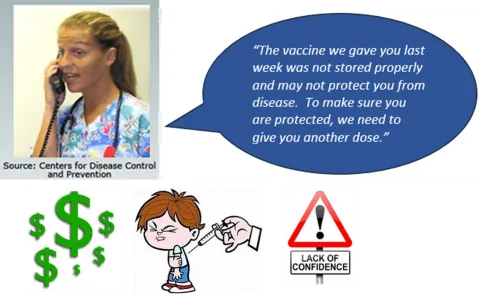
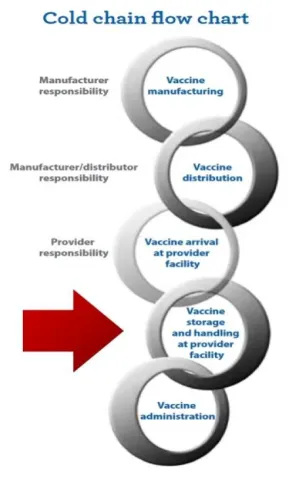
The key to maintaining vaccine at the proper temperature begins with the cold chain. The Cold Chain is an uninterrupted management of the vaccine from the manufacturer until the vaccine ends in the patient’s body. Any break in the link of the cold chain can create reduced potency of the vaccine. Unfortunately, a broken link in the cold chain can cost more than just the actual dollar amount of the vaccine. Time and resources of clinic staff and parents are wasted. Clinic staff will have to call parents of children that have been given vaccine with questionable potency; parents will have to take time off work to bring children back to the clinic to be re-vaccinated. A loss of confidence or lack of confidence in the clinic, nursing staff or the physician could also result from failure to maintain the cold chain
Storage and Handling
Vaccine loss is both costly and preventable. Just ten doses of each routinely recommended child/adolescent vaccine are valued at more than $10,000.00; most VFC providers have far larger inventories. Vaccine must be stored appropriately to maintain efficacy. Failure to store and handle vaccine properly reduces potency, resulting in inadequate immune response and poor protection against disease. The temperature-controlled environment used to maintain and transport vaccines in optimal condition is call the vaccine cold chain. An effective cold chain relies on three main elements:
- Effectively trained personnel
- Reliable storage and temperature monitoring equipment
- Accurate vaccine inventory management
A well-trained staff, familiar with key storage and handling principles, is critical to safeguarding the vaccine supply and the safety of vaccinated patients.
Can you tell the difference?

Vaccine Storage Units
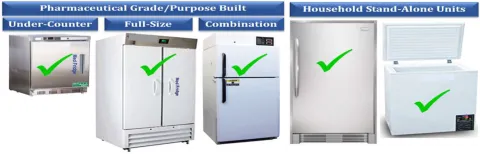
Refrigerators and freezers are available in different grades (household and purpose-built), size, and types (stand-alone and combination refrigerator/freezer). Purpose-built units are sometimes referred to as pharmaceutical grade and are designed specifically for storage of biologics. VFC vaccine storage units must have enough space to store the largest amount of inventory at the busiest point in the year (e.g., flu season) without crowding. The following storage units are acceptable for storing VFC vaccine:
- A purpose-built unit for vaccine storage designed to either refrigerate or freeze (can be compact, under-the-counter style or large units).
- A stand-alone household refrigerator (a self-contained unit that only refrigerates).
- A stand-alone freezer.
A VFC Consultant is able to offer consultation prior to unit purchase to ensure the units meet VFC program requirements. When a VFC provider purchases new vaccine storage units, five days of stable temperatures with a currently calibrated digital data logger thermometer must be documented prior to the VFC Consultant validating the storage unit. Prior to validation, VFC vaccine must not be stored in the unit.
Unacceptable VFC storage units
- Combination refrigerator/freezer units.
- Dormitory or bar-style refrigerators (small combination refrigerator/freezer unit that is outfitted with one external door and has an evaporator plate (cooling coil) located inside the freezer within the refrigerator; this type of unit places vaccine at high risk of freezing)
Storage Unit Placement/Maintenance
Air circulation around the outside of the storage unit is important for vaccine temperature stability. Place a storage unit in a well-ventilated room, leaving space between the unit, ceiling, and walls. Nothing should block the cover of the motor compartment. The unit should be stable and level, with the bottom of the unit raised above the floor. The unit door should open and close smoothly and fit squarely against the body of the unit. If not secured properly, unit doors pose a risk to maintaining appropriate internal temperatures of vaccine storage units. Studies find that most units work best when placed in an area with standard indoor room temperatures, usually between 20ºC-25ºC or 68ºF-77º. Check the manufacturer-supplied owner’s manual for additional guidance on placement and spacing.
Conduct routine maintenance for all vaccine storage units and related equipment:
- Check seals and door hinges.
- Clean coils and other components per manufacturer direction.
- Defrost manual-defrost freezers.
- Clean the interior of each unit to discourage bacterial and fungal growth. Do so quickly to minimize the risk of a temperature excursion.
- Test any back-up generator quarterly and have it serviced annually.
VFC providers with doorless or vending style units must have annual service records for those units.
Power Source/Breaker Box
The unit’s power source must be protected with warning labels. The circuit breaker must also be marked.
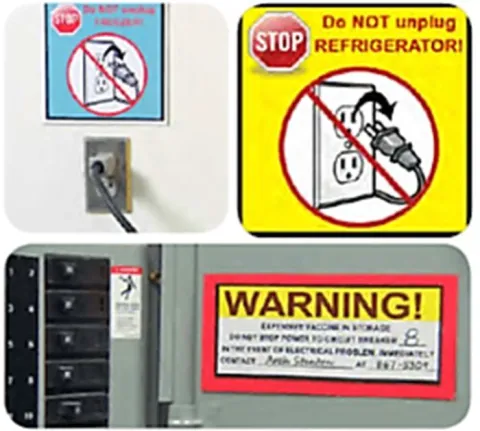
Do not use:
- Power strips
- Outlets that can be activated by a wall switch
- Outlets with built in circuits
- Extension cords
Temperature Monitoring Devices
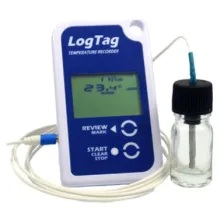

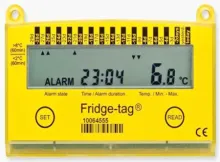
VFC providers must use a digital data logger (DDL) with continuous temperature monitoring capability and a current and valid Certificate of Calibration Testing in each unit storing VFC vaccines. DDLs must be used during routine, on-site vaccine storage, vaccine transport, and temporary vaccine storage.
To meet VFC Program requirements, the DDL must be equipped with:
- A detachable glycol probe
- Audible alarm set for out-of-range temperatures
- Display indicating the current, minimum and maximum temperatures
- An active display outside of the unit to monitor temperature without opening the unit door
- Low battery indicator
- Ability to accurately report temperatures to +/-0.5ºC
- Memory storage of at least 4,000 readings
- User programmable logging interval set for every 15 minutes or less
- Ability to easily download data for review
In addition, VFC providers must have at least one back-up DDL with a valid and current Certificate of Calibration to ensure that temperature assessment and recording may be performed twice each day. A back-up DDL must be readily available in case a DDL in use is no longer working. The back-up DDL is also used for vaccine transport or temporary storage.
Certificate of Calibration Testing
The Certificate of Calibration Testing is a document that attests to the fact that a temperature monitoring device is measuring temperatures accurately. Valid and current Certificates of Calibration Testing must be maintained on all DDLs used in vaccine storage units and the back-up DDL. Calibration testing and traceability must be performed by:
- A laboratory accredited by an ILAC MRA signatory body. Certificates must include the following elements:
- ILAC/MRA signatory body accredited laboratory
- Name of Device (optional)
- Model/Device Number
- Serial Number
- Date of Calibration Testing (report or issue date)
- Confirmation that the instrument passed testing (or instrument in tolerance)
- An entity that provides documentation the calibration testing performed meets ISO/IEC 17025 international standard for calibration testing and traceability. Contact your VFC Consultant for guidance on calibration testing requirements. Certificate must include the following elements:
- Name of Device (optional)
- Model/Device Number
- Serial Number
- Date of Calibration Testing (report or issue date)
- Confirmation that the instrument passed testing (or instrument in tolerance)
- Statement that calibration testing conforms to ISO 17025
Thermometer and calibration information must be entered and/or updated in ShowMeVax under ‘Clinic Tools’, ‘Manage Assets’.
Temperature Probe Placement
The DDL probe must be placed in the central/middle of the storage unit with the vaccines. Do not place the probe in the doors, near or against the walls, close to vents, or on the floor of the vaccine storage unit. Temperatures in these areas of the storage unit differ significantly from the temperature in the area where the vaccine is actually stored. The VFC Program recommends that the probe be anchored in the center of the unit to prevent the probe from being moved (bread ties or electrical zip-ties work very well for the anchoring process).
Temperature Monitoring
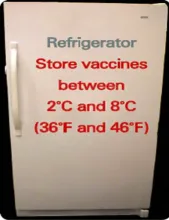
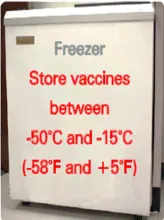
VFC vaccines must be stored at the proper temperature at all times. Refrigerators should maintain temperature between 2ºC and 8ºC (36ºF to 46ºF). Colder is not better for a refrigerator unit. The average daily temperature target for a refrigerator is 5ºC. Freezers should maintain temperatures between -50ºC and -15ºC (-58ºF to 5ºF), with a suggested target of -20ºC or colder. Most freezers may safely be set on the coldest setting as freezers do not reach -50ºC unless specifically designed to do so.
Temperature monitoring is the primary responsibility of the Primary VFC Contact or the Back-Up VFC Contact. Temperature must be documented in one of the following methods:
- Enter temperatures twice daily in ShowMeVax (morning and afternoon) from the DDL for each storage unit. DDL reports must be downloaded and reviewed once per month and remain on file at the clinic for a minimum of three years. VFC providers entering temperatures daily into ShowMeVax do not need to keep a paper log.
- Record temperatures on a paper log with AM and PM temperatures, plus minimum and maximum in the AM. Each reading should include the time, date, and name (or initials) for each reading. Paper log must remain on file for a minimum of three years. DDL reports must be downloaded and reviewed once per month and remain on file at the clinic for a minimum of three years. Temperatures must be manually entered into ShowMeVax weekly, bi-weekly or monthly.
- Record temperatures on a paper log with AM and PM temperatures, plus minimum and maximum in the AM. Each reading should include the time, date, and name (or initials) for each reading. Paper log must remain on file for a minimum of three years. DDL reports are downloaded and reviewed once per month and remain on file at the clinic for a minimum of three years. The download from the DDL is uploaded to ShowMeVax or a template is completed and uploaded to ShowMeVax monthly.
If a DDL has the ability to record twice daily readings that include the reviewer’s name, date, and time of review, the VFC provider may use this function to document daily readings in lieu of completing a paper temperature log. DDLs must still be downloaded and reviewed monthly and remain on file at the clinic for a minimum of three years.
For assistance with temperature documentation, please contact the Vaccine Support Team at 866- 256-3166 or by email at VFC-SMVsupport@health.mo.gov. You may also reach out to your VFC Consultant for issues with temperature documentation.
Temperature Excursions
Temperature excursions occur when the actual, minimum or maximum temperature deviates from 2ºC and 8ºC (36ºF to 46ºF) in the refrigerator or deviates from -50ºC and -15ºC (-58ºF to 5ºF) in the freezer. Each excursion must be reported to the VFC Program regardless of the length of time of the excursion.
When a temperature excursion occurs, VFC vaccine must be quarantined until the viability of the vaccine is determined. To quarantine the VFC stock, label the stock in the unit “Do Not Use”. Do not remove the VFC vaccine from the storage unit if the unit is in the recommended temperature range, leave the vaccine in the unit until the viability has been determined. VFC Consultants or the Vaccine Support Team can assist VFC providers with temperature excursions.
If the unit is out of the recommended temperature range, VFC providers must deploy the Emergency Response plan with the quarantined vaccine.
A VFC provider will need to complete an Emergency Response Worksheet and contact vaccine manufacturers for the vaccine viability determination. Once the determination has been completed, all paperwork (manufacturer reports and the Emergency Response Worksheet) must be submitted to the Vaccine Support Team at VFC-SMVsupport@health.mo.gov. Once the paperwork has been received, the help desk will notify the VFC provider to remove the quarantine from the VFC stock.
Power Outage
If a VFC provider experiences a power outage, please contact the utility company. If restoration of power is expected within four hours, do not move the vaccine. Keep the door closed and monitor the temperatures. This brief outage may be less harmful than transporting the vaccine. If a power outage is expected to last more than four hours, implement the Emergency Response Plan for the clinic. If the outage results in a temperature excursion, please see above.
Moving Storage Equipment
VFC providers that are moving a storage unit from one area or room of the current building to another must notify their VFC Consultant of the storage unit move. The breaker box panel labeling must be updated to show the new breaker in the panel if the circuit breaker has changed.
VFC providers moving to a new location must notify the VFC Consultant at least ten days in advance of the move. VFC providers must:
- Move the vaccine to the emergency location for safe storage.
- Document five days of current, minimum and maximum temperatures on a current, calibrated DDL.
- Email the temperature log to the VFC Consultant.
- Email or text pictures showing that the circuit breaker panel is labeled at the new location and that the electrical outlet has a “Do Not Unplug” sticker.
The VFC Consultant will give clearance to the VFC provider to resume storing the vaccine in the storage units.
Vaccine Management
Vaccines For Children Provider Manual
Primary VFC Contact/Back-Up VFC Contact
The Primary VFC Contact is responsible for ensuring all vaccines are stored and handled properly. Each VFC provider must have at least one Back-Up VFC Contact to serve in the absence of the primary contact. Both the Primary VFC Contact and the Back-Up VFC Contact should be fully trained in routine and emergency policies and procedures. Primary VFC Contact and Back-Up VFC Contact responsibilities include:
- Ordering vaccines
- Overseeing receipt and proper storage of vaccine deliveries
- Completing vaccine reconciliation
- Organizing vaccines within the storage units
- Setting up DDLs
- Reading and recording storage unit temperatures (including actual, minimum and maximum)
- Downloading and reviewing DDL information at least monthly
- Rotating stock to ensure the earliest expiration dates are used first
- Removing expired vaccines from storage units
- Responding to temperature excursions
- Maintaining all documentation
- Ensuring staff is properly trained
- Monitoring operation of storage equipment and systems
- Overseeing proper vaccine transport (if needed)
- Overseeing emergency preparations
Vaccine Storage
Placement and organization within the storage unit is vital to maintaining vaccine stability. The following vaccine management practices are required for VFC providers:
- Store vaccine in the original packaging (including UV protective bags used by CDC’s centralized distributor for single dose vaccines).
- Original Packing:
- Acts as a moisture barrier for the vaccine
- Prevents breaking
- Has the correct lot number
- Eliminates errors
- Exceptions:
- Vaccines transferred without a box
- Single dose shipments
- Damaged boxes
- Storage in a Pyxis © like refrigerator
- Original Packing:
- Store vaccines in the central or middle part of the unit, with space between both the vaccine and the sides/back of the unit.
- Do not store vaccines in the doors, vegetable or crisper bins, or on the floor of the unit, or under or near cooling vents.
- Do not store food or drink in vaccine storage units.
- Place water bottles or coolant packs throughout the refrigerator and freezer storage units to:
- Stabilize or extend temperatures during a power outage,
- Dampen the effects of frequent opening/closing of door, and
- Serve as physical barriers preventing the placement of vaccines in areas of the unit that are at high risk for temperature excursions. The only exception is if a unit manufacturer indicates water bottles or coolant packs could negatively impact unit functionality.
- Rotate stock regularly or when a new shipment arrives so that newer vaccines are stored behind the soonest-to-expire.
- Immediately remove any expired vaccine from the storage unit. Bag and label all expired vaccine as “Do Not Use” until the vaccines are able to be returned.
- Open only one vial or box of a particular vaccine at a time to control vaccine use and allow for easier inventory control. For multi-dose vials, indicate on the label the date and time the vial was reconstituted or first used. Make a tick mark on the label when administered in order to keep inventory control of the multi-dose vial. Do not discard multi-dose vials of IPOL (Inactivated Poliovirus Vaccine) before the expiration date on the vial until the vaccine has expired. Open vials of IPOL cannot be returned or transferred.
- Store vaccine products with similar packaging in different locations in the storage unit to avoid confusion and vaccination errors.
- Limit access to the vaccine supply to authorized personnel only.
- Install locks on refrigerators and, if possible, the electrical plugs. Label the plugs “Do Not Disconnect.”
- Vaccines must be prepared immediately prior to administration.
- Write the expiration date on the outside of the box so it is easily visible yet not obscuring vital vaccine information on the box.
- Check to make sure that refrigerator and freezer doors are shut regularly.
- Organize your vaccine by age group.
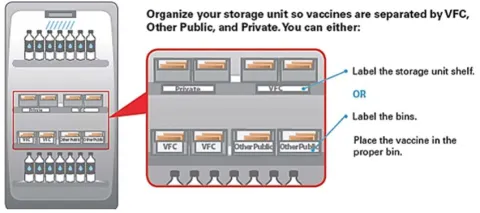
- VFC, 317 and private stock must be easily distinguished. You may use separate shelves, separate units, or bin storage.
- Use open baskets for vaccine organization and air circulation.
- Arrange vaccines/diluent in rows, allowing for air circulation.
- Arrange vaccines/diluents centrally at least two to three (2 – 3) inches from walls, ceiling, floor and door
Question: Can we store other biologics or medicine in the vaccine refrigerator or freezer?
Answer: Storing biologics or medicine is not a recommended practice. This can lead to administration mistakes. However, if done, the biologics or medicine must be on the lowest shelf in the unit.
Vaccine Temporary Storage/Transport
The VFC Program and CDC do NOT recommend routine transport of VFC vaccines. If transport does occur, vaccines should only be transported using appropriate packing materials that provide maximum protection. The CDC and the VFC Program recommend a portable refrigerator/freezer for vaccine transport (this type of unit is powered and is specifically designed for use during vaccine transport). Transfers of VFC stock can only occur:
- With approval from the VFC Program to another VFC provider.
- When a process is in place to ensure VFC vaccine viability, as outlined in CDC’s Vaccine Storage and Handing Toolkit [BROKEN LINK]. This must include use of a current certified, calibrated DDL for temperature monitoring during transport, as well as other appropriate equipment below.
- Ensuring total time for transport or transport plus off-site clinic cannot exceed eight (8) hours.
If any temperature excursion occurs during transport or off-site clinics, follow the excursion protocol as noted in Section 5.7 of this manual.
Transport Situations and Packing Methods
Transport packing methods differ between 1) Emergency transport and 2) Planned transport such as for off-site clinic, satellite clinics, or re-location of stock. A portable refrigerator/freezer is always the preferred method. Do not utilize food/beverage coolers or soft-sided coolers for transporting vaccine.
- Emergency transport requires either portable vaccine storage units (portable vaccine refrigerator/freezer), qualified containers and pack-outs, or the conditioned water bottle transport system. For step-by-step guidance on packing a cooler for emergencies using the conditioned water bottle method, see CDC’s Packing for Emergency Transport.
- Planned transport requires either portable refrigerators/freezers or qualified container and pack-outs. The conditioned water bottle method cannot be used for planned transport. Follow instructions specific to the portable refrigerator/freezer or qualified container/pack-out.
| Transport Method Requirements | Emergency Transport | Planned Transport (Off-site clinic, Satellite clinic, or relocation of stock) |
|---|---|---|
| Portable Vaccine Refrigerator/Freezer (preferred) | Yes | Yes |
| Qualified Container and Pack-out | Yes | Yes |
| Conditioned Water Bottle Transport System | Yes | No (Container must be opened/closed too often for this method) |
| Original manufacturer shipping container | Yes | Yes |
Materials for Transport
Maintain sufficient materials for transport of your largest inventory. Keep these available at all times. Materials include:
- Portable vaccine storage units (refrigerator/freezer units)*
- Qualified vaccine-specific coolers or pack-out containers*
- Hard-sided insulated containers or Styrofoam coolers
- Coolant materials (phase change materials (PCMs) for vaccine-specific coolers above*
- Gel or ice packs
- Frozen water bottles that are conditioned to maintain vaccine storage ranges (for emergency transport only)
- A DDL (current, certified calibrated and place the probe as close to the vaccine as possible)
- Insulating materials (packing peanuts, bubble wrap)
- Stabilization materials (corrugated cardboard cut to fit the container)
* Recommendations only. These items are recommended, but not required.
Do not use dry ice, the vaccine cooling packs from shipments, or soft-sided food/beverage coolers for transport or temporary storage.

Vaccine Expiration Dates/Expired VFC vaccine
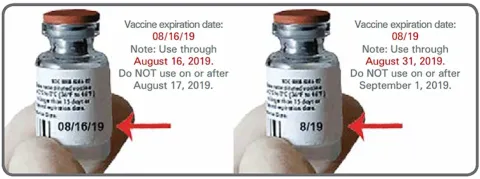
Please see the picture below for guidance on expiration dates for vaccines. Remove any expired VFC vaccine(s) or diluent and place in a bag or box labeled “Do Not Use – Expired”. VFC providers should complete the return process for expired VFC stock prior to the monthly reconciliation. Once a VFC vaccine expires, it will no longer appear in the ‘On Hand’ Inventory menu in ShowMeVax. The individual completing the reconciliation will need to go into the inventory menu, change the status from on-hand to depleted/expired and complete a return for the expired inventory item. The Vaccine Support Team will approve the return and the Primary VFC Contact will receive a return label from pkginfo@ups.com. The expired vaccine will be listed in red on the reconciliation and the individual completing the reconciliation will report how many doses were given prior to the expiration and report zero on hand. The expired vaccine(s) will need to be packed in a box, labeled with the emailed return label and picked up by UPS (calling for a pick-up will result in a charged fee).
VFC providers must make at least three attempts to transfer public vaccines (VFC, CHIP, or 317) to other approved VFC providers at least ninety (90) days in advance of the expiration. Failure to make three attempts to transfer the public vaccines could result in having to replace the vaccine dose-for dose with private stock. Transfer attempt information (VFC Provider, name, date) should be documented in ShowMeVax under the ‘Clinic Comment’ section of the return and kept on file at the clinic for at least three years. VFC Consultants may review the transfer attempts at VFC site visits.
If you need assistance with VFC vaccine returns, you may contact the Vaccine Support Team at 866- 256-3166 or by email at VFC-SMVsupport@health.mo.gov.
VFC Visits
Vaccines For Children Provider Manual
The VFC Program conducts site and educational visits and assessments with each VFC provider.
Enrollment Visit
Enrollment visits are required for newly enrolling providers or VFC providers that have dis-enrolled in the program for six (6) months or more. The purpose of this visit is to provide education on the VFC Program requirements and to verify the VFC provider meets the program requirements. VFC Consultants conduct the enrollment visit and approve the VFC provider. Following the enrollment visit, a full/initial VFC compliance visit will occur in three to six (3 – 6) months. VFC providers must have experience ordering and administering VFC vaccines prior to the full/initial VFC compliance visit.
Compliance or Site Visit
A compliance or site visit consists of an examination of vaccine management and delivery practices to ensure compliance with VFC Program requirements. The site or compliance visit involves administration of a questionnaire, evaluating compliance with requirements and providing education. During the visit, there will be a formal review of vaccine management practices, as well as a review of patient records and other documentation to assure appropriate vaccine eligibility screening and administration documentation is occurring. VFC Consultants conduct VFC site or compliance visits at least every twenty-four months. VFC providers with non-compliances at site visits must submit all necessary corrections to the VFC Consultant.
Some areas assessed at a site visit include:
- Identifying VFC-eligibility criteria
- Providing billing information, including administration fees
- Eligibility and screening documentation
- Vaccine Management Plan [NEEDS LINK] [BROKEN LINK] and Emergency Response Plan [NEEDS LINK] [BROKEN LINK] review
- Chart/record review for documentation
- Borrowing reports
- Temperature reports and documentation
- Storage unit and vaccine inventory assessment
- Certificates of calibration for DDLs
Storage and Handling Visits
The VFC Program conducts both unannounced and announced storage and handling visits. These visits serve as “spot checks” for VFC providers and the management of VFC vaccines. Storage and handling visits are not considered site or compliance visits and do not count toward the annual training requirement. VFC Consultants conduct storage and handling visits; any corrections not completed during the storage and handling visit are submitted to the VFC Consultant.
Educational Visits
The VFC Program offers educational visits for VFC providers when there is a change in the Medical Director, Primary VFC Contact or Back-Up VFC Contact. Educational visits can also be conducted when there are concerns at the clinic regarding compliance with VFC Program requirements. VFC Consultants can offer technical education to ensure the VFC provider meets program requirements. Please contact your VFC Consultant for this type of visit.
Immunization Quality Improvement for Providers (IQIP)
IQIP is CDC’s national quality improvement initiative for VFC providers. The purpose of IQIP is to promote and support the implementation of provider-level immunization quality improvement strategies designed to increase vaccine uptake among children and adolescents, in adherence to the routine schedule recommended by ACIP.
IQIP Consultants conduct IQIP visits with select VFC providers in their region annually. The goals of IQIP visits are to ensure providers are:
- Aware of and knowledgeable about their immunization rates,
- Motivated to incorporate changes into their current practices,
- Ready to try new immunization service strategies, and
- Capable of sustaining improvements to their vaccination delivery services.
The IQIP process begins with assessments conducted on 24 – 35-month-old children and 13 – 17- year-old adolescents, using immunization data from ShowMeVax. Children are assessed based on the 4 DTaP, 3 Polio, 1 MMR, 3 Hib, 3 Hep B, 1 Varicella, and 4 PCV series, and adolescents are assessed based on the meningococcal, Tdap, and HPV series according to their age.
Coverage rates are shared with the provider and staff during the initial IQIP site visit and then discuss strategies to improve immunization rates.
Two and six months after the initial IQIP visit, the IQIP Consultant will conduct check-ins via telephone to review the progress. Twelve months after the initial IQIP visit, the IQIP Consultant will conduct a follow-up in-person or by telephone to review progress and possible changes in the assessment rates.
Regional IQIP Consultants [NEEDS LINK] can be contacted for additional information regarding assistance with IQIP visits or assessments